By Year
Watch the timeline breathe.
Compare proposal traffic year by year to find active eras, quiet stretches, and the moments when standards work picked up speed.
Best for spotting long-term cycles and release-era surges.
Real-time documentation for proposal lifecycle, upgrade progress, and editorial activity across EIPs, ERCs, and RIPs, with structured guides and references for contributors and developers.
We build an operational view of EIPs, ERCs, RIPs, proposal workflows, and governance movement so builders, editors, researchers, and newcomers can understand what is changing and why.
Make Ethereum standards and governance legible, explorable, and operationally useful.
EIPs, ERCs, RIPs, PR activity, editor workflows, contributor graphs, and status transitions.
Because governance data is public, but still too fragmented for most people to work with efficiently.
Avarch with support from the Ethereum ecosystem and partners close to standards operations.
Ethereum governance happens across repositories, pull requests, review queues, forum threads, upgrades, and informal coordination. The data is public, but the workflow is still hard to inspect as a system.
EIPInsight exists to reduce that gap. We aggregate the moving parts, normalize them into product surfaces, and help people answer practical questions: what changed, what is stuck, who is active, what upgrade work depends on what, and where to go next.
The goal is not just more charts. The goal is operational clarity for anyone trying to understand or participate in Ethereum standards.
Search proposals, people, and governance events with structured filters instead of manual repository digging.
Track lifecycle movement, editorial load, PR activity, and standards composition through dashboards and timelines.
Use boards, dependency maps, builder, and explorer views to move from reading governance to working with it.
Pair raw data with commentary, docs, videos, and news so the platform stays useful for both learning and operations.
EIPs are the primary mechanism for proposing changes to the Ethereum protocol. They follow a standardized process from initial discussion through community review to final implementation.
ERCs define standards for tokens and smart contract interfaces. The most well-known is ERC-20 (fungible tokens), but there are many others including ERC-721 (NFTs) and ERC-1155 (multi-token standard).
RIPs provide a standardized way to propose and discuss improvements to rollup solutions and scaling solutions built on Ethereum.
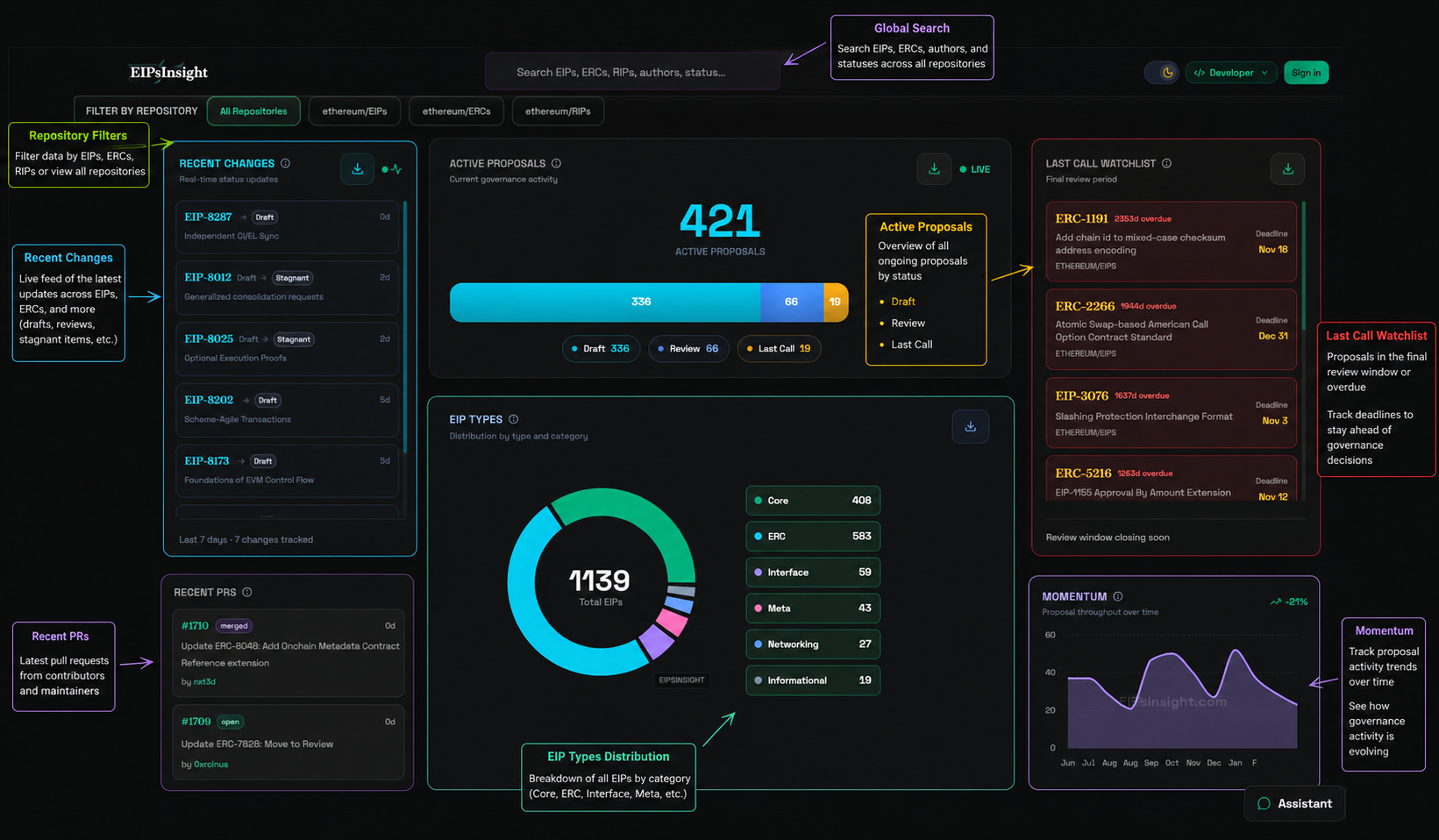
Initial discussion and feedback gathering from the community
Formal proposal writing with specification details
Community and core developer review and feedback
Accepted and ready for implementation
Explore views turn the standards feed into focused lenses, helping you spot spikes, stalls, ownership patterns, and category shifts without digging through raw lists.
Compare proposal traffic year by year to find active eras, quiet stretches, and the moments when standards work picked up speed.
Track Draft, Review, Last Call, Final, and Deferred states as a funnel so you can instantly see what is progressing and what needs attention.
Follow authors, editors, reviewers, and implementers to understand who is shaping the proposal, who is reviewing it, and where responsibility sits.
Group standards by category to separate Core work from ERCs, interfaces, and other tracks so the mix of proposal types stays easy to read.
Follow how Ethereum upgrades move from proposals into coordinated network change. This section ties together EIP inclusion, client readiness, and the major milestones that shape each upgrade cycle.
Follow previous upgrades, current focus, and next planned fork windows in one row.
Inspect how included, soft-frozen, deferred, and dropped EIPs evolve across checkpoints.
See who authored and reviewed key proposals to understand ownership and bottlenecks.
Monitor readiness signals before activation so teams can plan releases and audits.
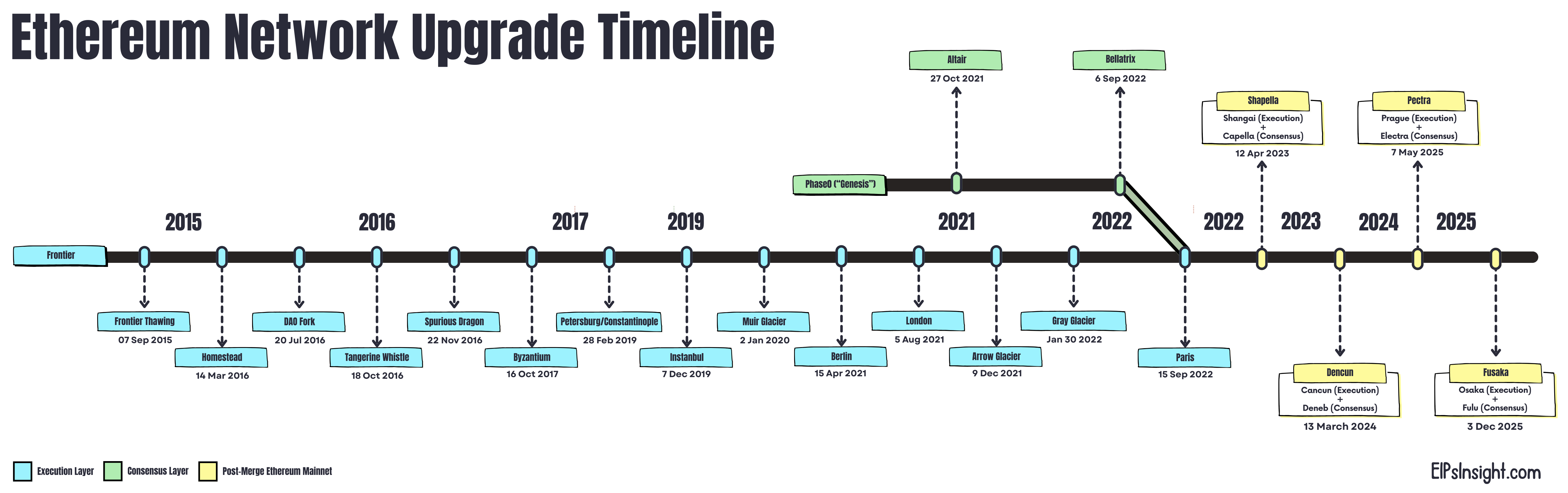
Start from the timeline row, then drill into EIP composition and status transitions. Use this order to quickly understand what changed, why it changed, and what is likely to ship next.
Find the target upgrade (for example Glamsterdam) and note its position between previous and upcoming forks. This gives you immediate release context.
Track milestones chronologically to understand dependency order. Earlier milestones usually represent prerequisites for later activation decisions.
Review included, review, blocked, deferred, and removed groups. This tells you what is stable versus still moving in governance discussions.
Map each major EIP to execution-layer, consensus-layer, or cross-layer behavior so implementation teams can estimate testing scope and risk.
Compare weekly snapshots to detect movement in EIP buckets. A shift from review to included is usually the strongest signal of likely inclusion.
Included EIP count, blocked proposals, and editor comments are the fastest indicators of upgrade health.
If an upgrade row stalls, inspect PR activity and unresolved review notes before assuming timeline slips.
Developers, researchers, and operators can align implementation and communication plans using the same source of truth.
EIPInsight uses the upgrade timeline to keep the next phase of Ethereum visible, from current standards work through the proposals expected to land in Glamsterdam and beyond.
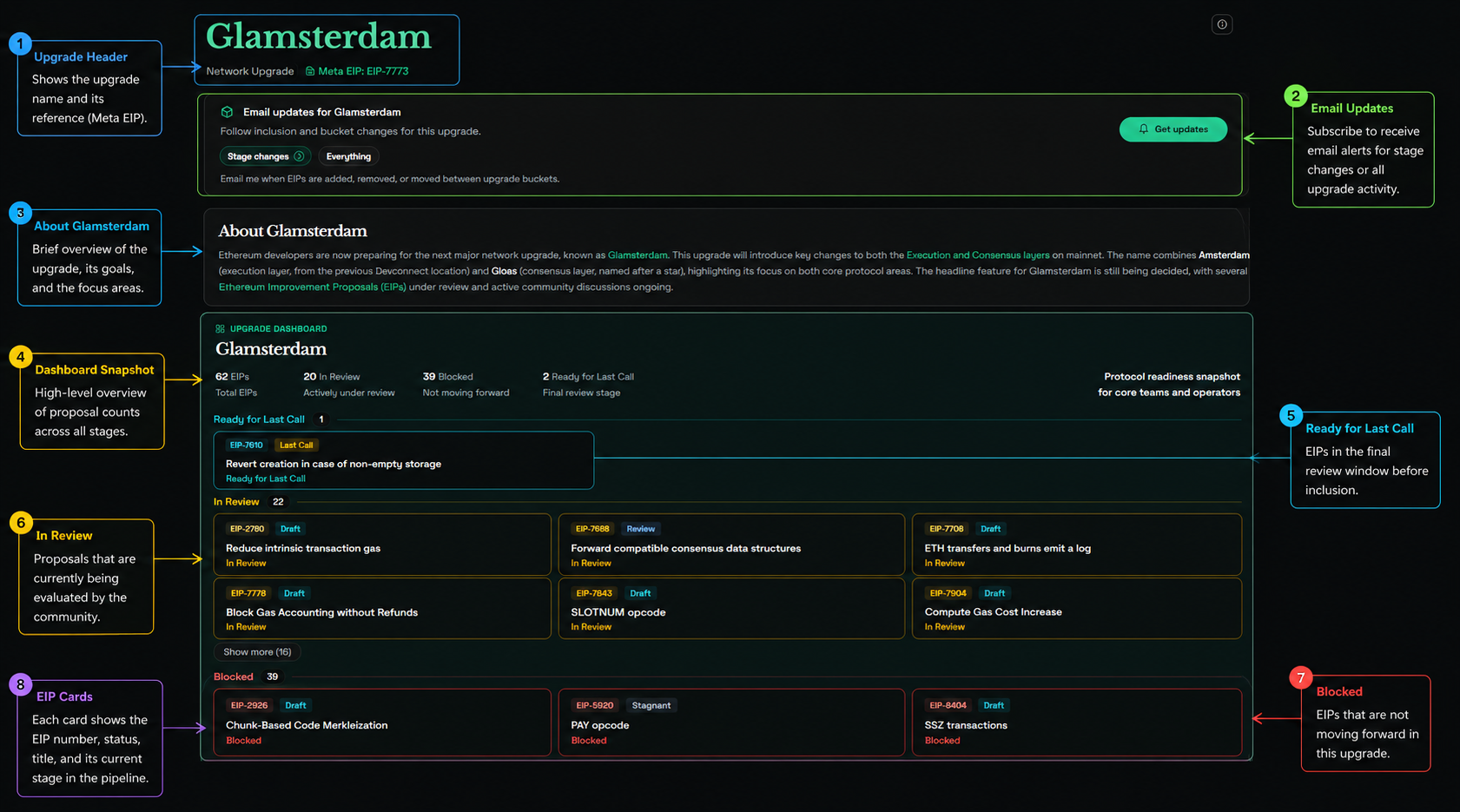
Analytics is designed for decision making, not just reporting. Use the guides below to understand what each view is for, which controls matter most, and how to read the visuals correctly.
Start here when you need a top-level pulse on standards flow, backlog risk, and which proposal categories are dominating the system.
This view shows how quickly work enters and exits review. It is best for spotting merge slowdowns, seasonal load, and review throughput changes.
The Issues page helps you inspect unresolved friction, recurring labels, and where open problem volume may slow standards progress.
The board is your operational workspace for selecting exact PR subsets and moving from dashboard insight to concrete follow-up actions.
Track editorial throughput, response time, and concentration of review ownership.
Measure reviewer cycles, leaderboard balance, and review latency distribution.
Understand repeat versus new author mix and proposal outcome patterns.
Read contribution heatmaps and activity types to detect participation trends.
Insights helps you move from metrics to interpretation. Each module below explains how to use the view, what controls matter, and how to read outcomes without misinterpreting short-term noise.
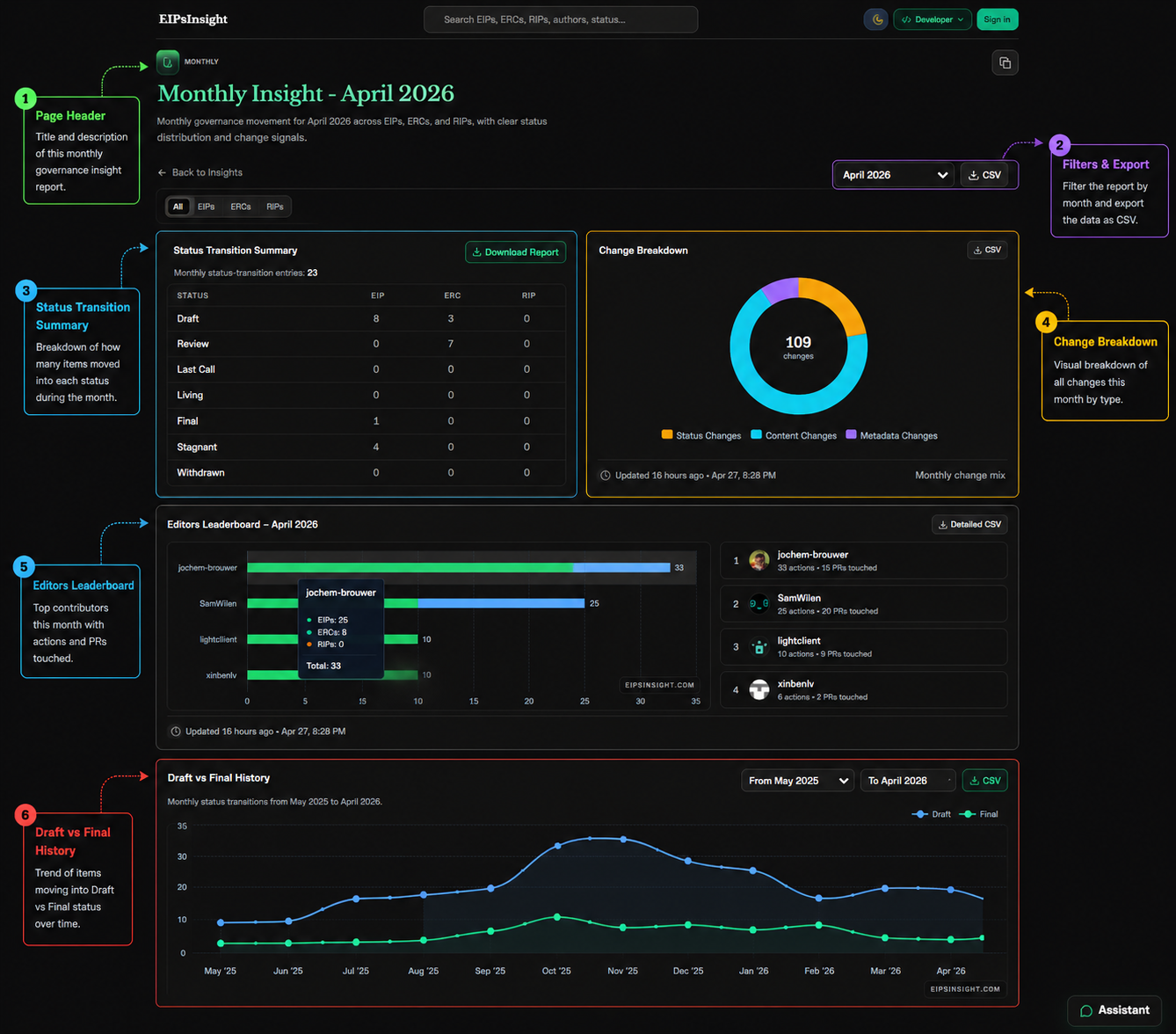
Use this when you want trend direction: whether proposal flow is accelerating, slowing down, or rotating between EIP, ERC, and RIP tracks.
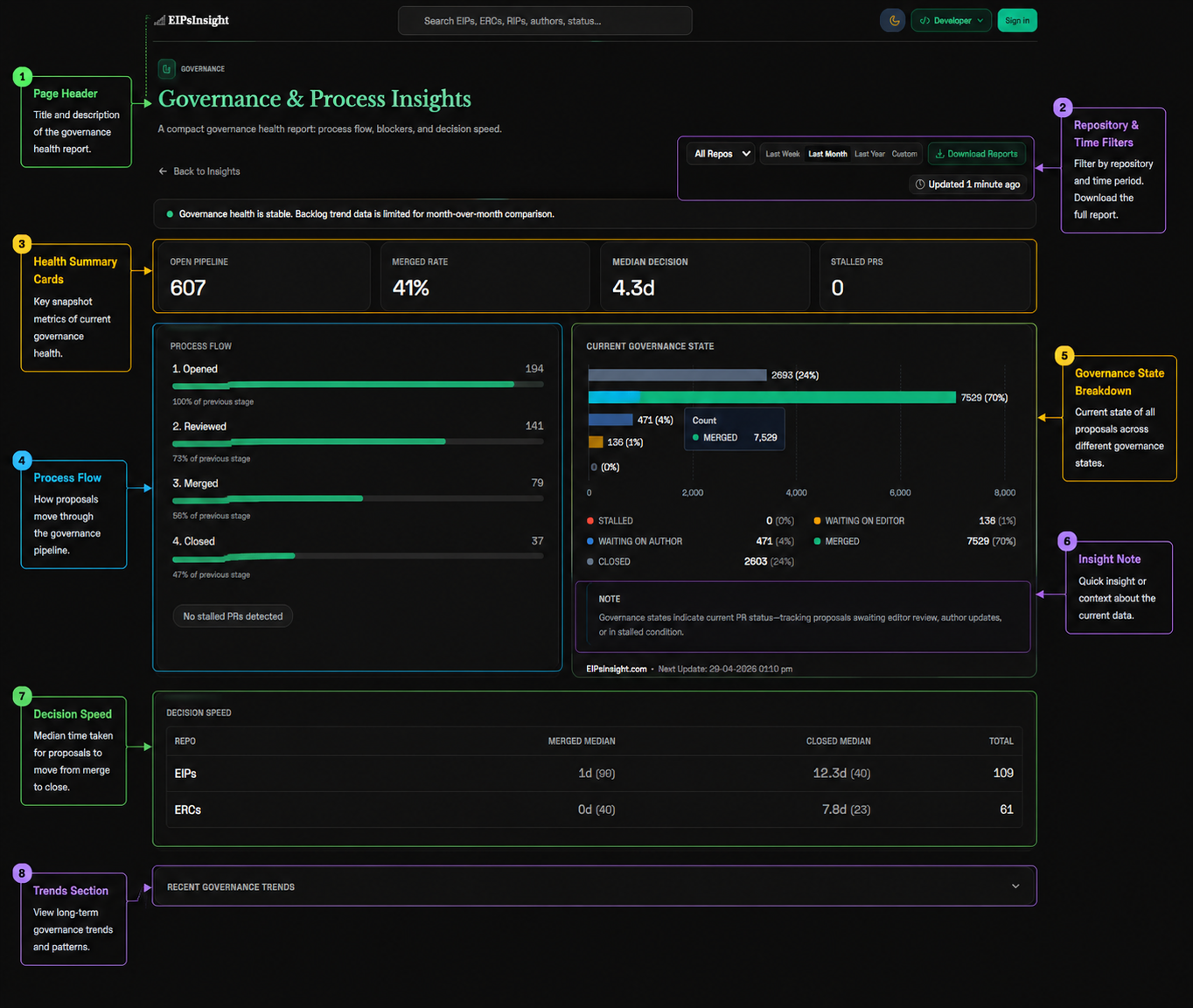
This view is your operational health report: it shows decision speed, process stage conversion, and where waiting states are accumulating.
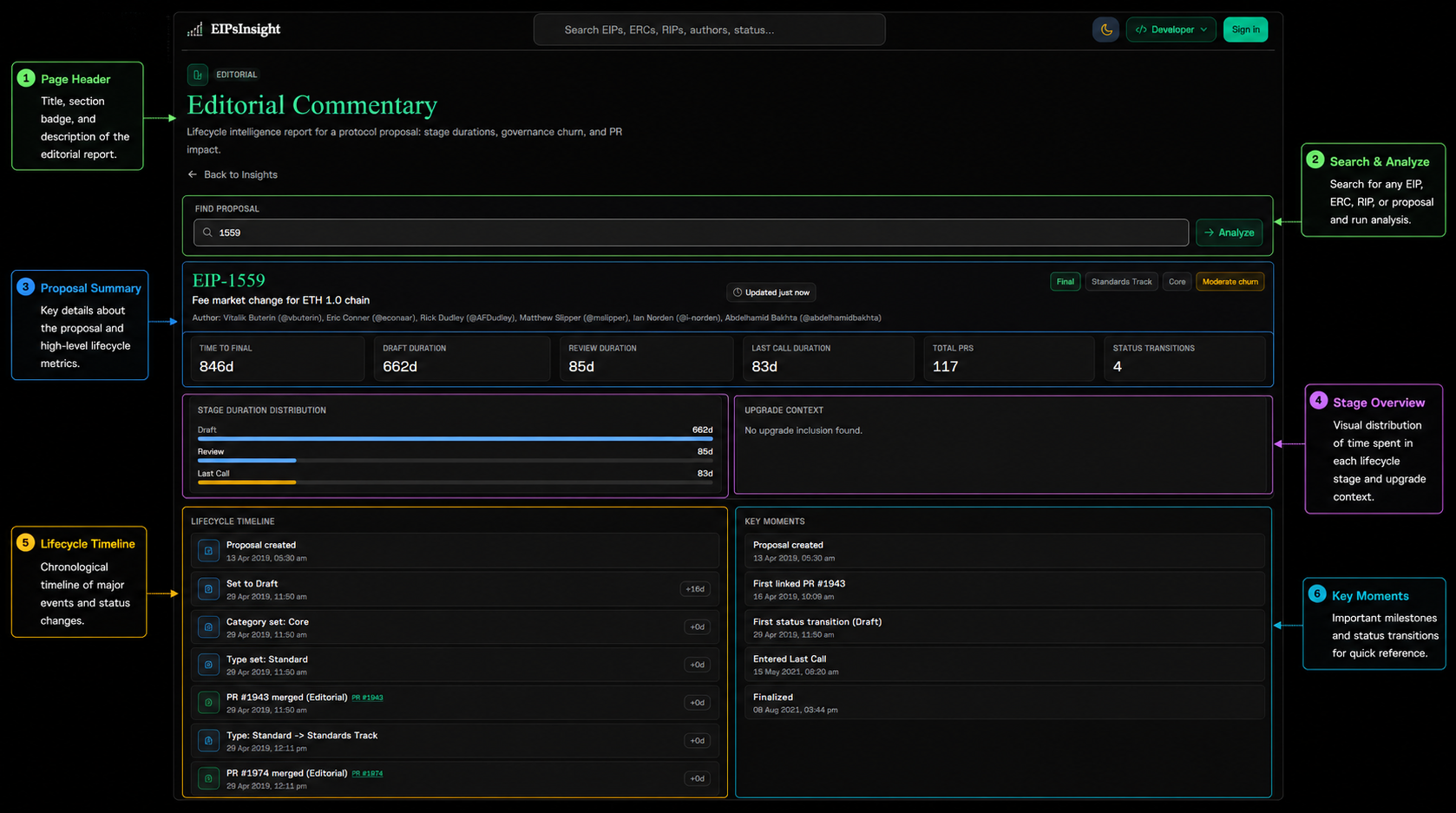
Use this module for a deep read on one proposal. It converts raw status history and PR context into an editor-style narrative of momentum and risk.
Productivity tools support day-to-day standards operations, from drafting proposals to tracking dependencies and upgrade windows.
Use guided templates and validation hints to draft cleaner proposals faster.
Track changes chronologically with milestone-level context for upgrades and proposal states.
Quick answers about standards, governance workflow, and how the platform works.
An EIP (Ethereum Improvement Proposal) is a design document that introduces a feature, process change, or environment change for Ethereum. EIPs are the main mechanism for proposing and documenting protocol and ecosystem improvements.
An ERC (Ethereum Request for Comments) is a category of EIP focused on application-level standards such as token interfaces and contract conventions. ERC standards help wallets, apps, and tools interoperate consistently.
A RIP (Rollup Improvement Proposal) is a standards document for Layer 2 rollup systems. RIPs define improvements and shared conventions for rollup implementations and ecosystem coordination.
EIP is the broad proposal framework for Ethereum improvements. ERCs are application-level standards within that framework. RIPs are rollup-focused standards for Layer 2 ecosystems. They share proposal mechanics but target different scopes.
Start with EIP-1 to understand the proposal process. Then read a few widely used standards such as ERC-20 and ERC-721, and track current drafts to see how review and governance shape proposals over time.
You can contribute by drafting proposals, reviewing open drafts, commenting during Last Call, improving specifications, and helping with implementation feedback. Many contributors begin by improving existing drafts before opening a new proposal.
An EIP moves through statuses such as Draft, Review, Last Call, and Final. In Draft, the proposal evolves. Review and Last Call gather final feedback. Final means the proposal is accepted and considered complete from a standards perspective.
EIP Editors maintain process quality. They review formatting and process compliance, coordinate status changes, and keep the repository organized. Editors do not unilaterally decide technical acceptance of proposals.
Last Call is the final review window before an EIP can become Final. It gives the community a final opportunity to comment and raise objections before status advancement.
There is no fixed duration. Simple proposals can progress quickly, while complex or controversial ones can take months or longer. Review speed depends on technical complexity, editorial feedback, and community consensus.
Common blockers include incomplete specifications, unresolved objections, weak implementation plans, missing test coverage, and unclear ecosystem impact. Coordination with upgrade timing can also delay status progression.
Acceptance is not controlled by one person. Editors manage process and quality, while technical acceptance depends on broad alignment across researchers, implementers, client teams, and community stakeholders.
Status can move backward when new issues are discovered, important objections arise, or substantial spec changes are needed. This is normal in open governance and helps prioritize correctness over speed.
EIPInsight tracks EIPs, ERCs, and RIPs across their lifecycle, plus pull request activity, governance signals, editor activity, contributor behavior, and proposal-level analytics to explain how standards evolve.
Core status and repository data are synchronized frequently from source repositories. Some aggregated analytics are cached and refreshed on intervals to balance freshness and performance.
Yes. Most analytics and standards views support export workflows such as CSV or JSON so teams can run custom analysis outside the app.
Use Standards for proposal details, Analytics for trends and workload, and Governance for process context. The best path depends on whether you are researching, building, or coordinating reviews.
Yes. EIPInsight links standards data with pull requests, issue activity, review metadata, and governance context so you can understand both proposal text and implementation discussion.
No. Most content is available without sign-in. Personas are preference presets that tune navigation and defaults for different workflows such as developer, editor, or researcher.
Operational views are designed to stay close to source activity, while heavier analytics may use short-lived caching. This keeps dashboards responsive while preserving trustworthy trend reporting.